
Your data stays with you. With proof.
ShamashAi's security architecture — at-rest + in-transit encryption, RBAC + MFA, append-only audit, KVKK Article 12 and ISO 27001:2022 Annex A evidence-mapped reporting. Production hardening checklist and air-gap deployment.
AT-REST
- · Device credentials → AES-256-GCM (CREDENTIAL_KEY)
- · API keys → limited by trustHost
- · Web push subscriptions → GCM AEAD
- · Agent token → SHA-256 hash (no plaintext in DB)
- · Password → scrypt (N=16384, r=8, p=1)
- · License key → Ed25519-signed JWT
- · MFA secret → encrypted (CREDENTIAL_KEY)
IN-TRANSIT
- · Web ↔ API → HTTPS (reverse proxy) · TLS 1.2+
- · Agent ↔ API → HTTPS · Bearer token
- · SQL ↔ API → TLS optional · trustServerCert env
- · Fortigate ↔ API → HTTPS REST · trusted host
- · vCenter ↔ Agent → HTTPS REST · InsecureTls flag
- · Helmet middleware → CSP, X-Frame-Options
- · CORS → SHAMASHAI_CORS_ORIGINS, wildcard forbidden
User authentication
| Topic | Detail |
|---|---|
| Algorithm | JWT HS256 · JWT_SECRET min 32 chars |
| Password | scrypt (N=16384, r=8, p=1) |
| Cookie | HttpOnly · SameSite=Lax · Secure (prod) |
| TTL | 7 days default · jti session row, revocable |
| Bootstrap | First admin via env ADMIN_EMAIL + ADMIN_PASSWORD |
3-role RBAC
| Role | Permissions |
|---|---|
| admin | Everything: users, license, retention, settings, delete |
| analyst | Event triage, incident close, SOAR block + quarantine, alert rule authoring |
| viewer | View only · export · reporting |
Project-scoped membership: the same user can have different roles in different projects. The backend enforces effectiveProjectRole(userRole, membershipRole) minimum at every endpoint. Analyst-role users can be further restricted with per-category permissions — e.g. "only firewall + switch visible, hide identity and database".
OIDC SSO (corporate identity provider)
- Standard OpenID Connect Authorization Code flow + PKCE
- Issuer, client_id and client_secret defined via env
- Login page shows a "Sign in with company SSO" button when OIDC is on; the local password form remains as an admin fallback
- User auto-provisioned from OIDC profile claims (email, name); default role assigned by admin on first sign-in
- Endpoints:
/auth/oidc/status,/auth/oidc/start,/auth/oidc/callback - Tested with Entra ID, Okta, Keycloak, Authelia and standard OIDC providers
OIDC is the clean way to delegate MFA to the identity provider — the IT manager manages one MFA policy in Entra/Okta, ShamashAi's local MFA stays off.
MFA policy enforcement
The admin panel governs MFA enforcement in three modes:
off— MFA optional (not the default — not recommended for production)admins— required for admin-role users only (default)all— required for all users including viewers
Policy changes are written to the audit log. When MFA becomes mandatory, the user is redirected to TOTP enrollment on next login; they can't reach internal pages until they complete it.
MFA · TOTP + QR code
beginUserMfaSetup→ 32-char secret + otpauth_uri (QR generated)verifyUserMfaSetup→ 6-digit code verification (TOTP, SHA-1, 30s window)disableUserMfa→ user disables their own (current TOTP required)resetUserMfaAdmin→ admin resets someone else's MFA (audit logged)- Login flow: password OK → if MFA enabled, prompt for 6-digit code → session start
Session management
listUserSessions(userId, limit=20)— IP, user agent, last_used, expires_atrevokeUserSession(userId, jti)— single sessionrevokeUserSessions(userId, exceptJti?)— everything else
Agent token
- Format:
shamashai_agent_<base64> - Stored: SHA-256 hash (no plaintext in DB)
- Per-project scope
- Plaintext shown once (at creation), unrecoverable afterwards
- Revocable, last_used_at tracked
| Table | Retention | Notes |
|---|---|---|
| events | Default 90 days | Per-project tunable projects.retention_days |
| reachability_logs | Separate (default 30 days) | Health checks — kept out of events |
| audit_log | Forever | Append-only · retentionless for forensics |
| soar_actions | Forever | Append-only · evidence |
| maintenance_windows | Forever | Past windows preserved |
| 5651 legal archive | 2 years | v1.5 roadmap (S3/MinIO) |
Nightly job: DELETE FROM events WHERE timestamp < NOW - retention_days. Manual run + stats endpoint for tracking. Retention changes are audit-logged.
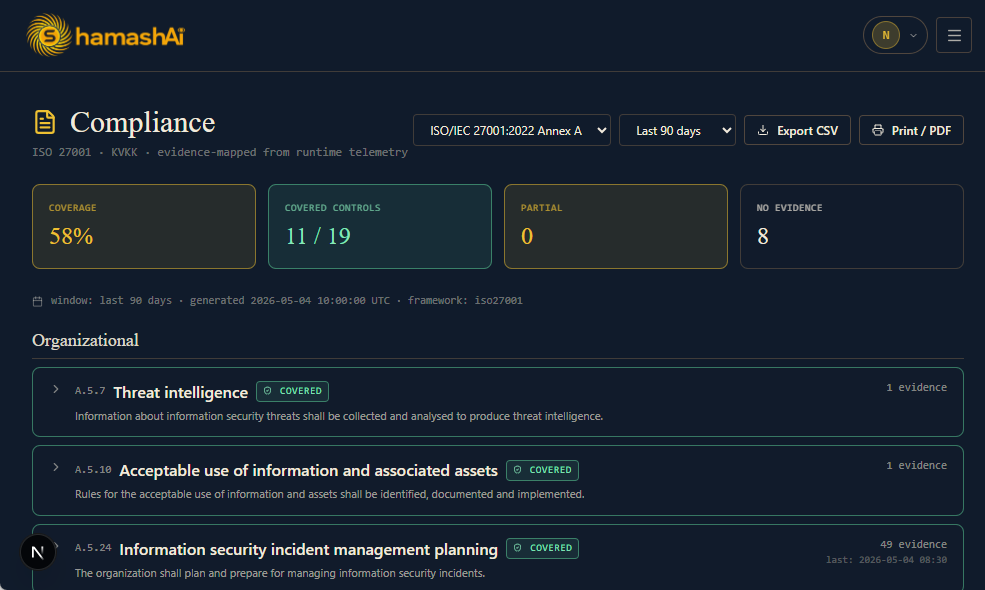
ISO/IEC 27001:2022 Annex A — 19 controls
- Organizational (A.5) — Threat intelligence, Acceptable use, Incident management, Event assessment, Incident response, Evidence collection
- People (A.6) — Awareness/training
- Technological (A.8) — Privileged access (A.8.2), Secure auth (A.8.5), Malware protection (A.8.7), Vulnerability mgmt (A.8.8), Configuration (A.8.9), Information deletion (A.8.10), Data leakage (A.8.12), Logging (A.8.15), Monitoring (A.8.16), Clock sync (A.8.17), Network security (A.8.20), Web filtering (A.8.23)
KVKK Article 12 — 6 sub-articles
- Preventing unauthorized access
- Log retention
- Retention policies
- Penetration test evidence
- Breach notification
- Audit readiness
Status computation
Each control has a min_evidence_count threshold. If event count exceeds it, the control is Covered; if events exist but fall short, it's Partial; if there are none, it's No evidence. Drilldown shows the evidence events in a list — ready for the auditor.
Export
- Print/PDF — clean stylesheet → "Save as PDF" via the browser
- CSV — control × status matrix
- Evidence pack — JSON + Markdown + HTML, downloadable ZIP
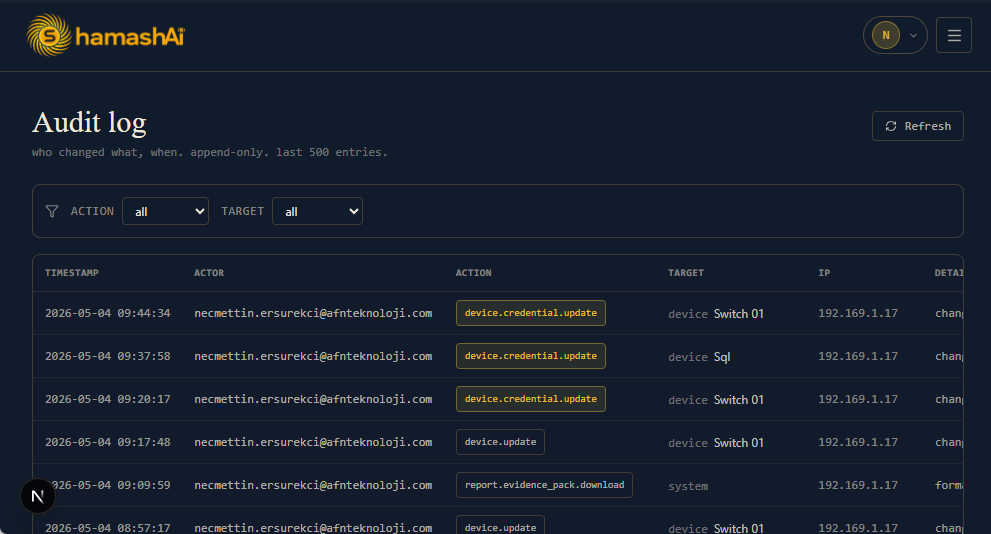
Every mutating action is appended to dbo.audit_log:
timestamp,actor(user email)action— e.g.device.create,device.delete,credential.update,soar.block,license.settarget_type,target_id,target_namedetail— JSON (which fields changed)ip— caller IP
Audit records survive project deletion (for forensics). Filters: action prefix, target. Last 500 entries by default, CSV export available.
At boot, validateRuntimeConfig() runs the checks below; an incompatible prod configuration is rejected:
The Operations page exposes GET /operations/preflight which shows all checks on a single screen — every item must be green before going live.
- No telemetry — phone-home is optional (only v2 license heartbeat)
- Customer data never goes to AI training (Anthropic API contract)
- Credentials are NEVER sent to AI — only anonymous fingerprint + sample
- AI output language is the customer's choice — Turkish by default, EN option; sample logs are passed through
redactSensitiveText()before going to AI - WhatsApp access token is stored AES-256-GCM encrypted; audit-logged with masking
- Synthetic demo dataset — isolated from production data; tagged
demo:synthetic, "Remove demo data" only deletes tagged rows, real events untouched - Air-gap deployment can disable all outbound traffic
- Backup/restore — JSON snapshot, single file, customer-controlled
- Per-deployment isolation — multi-tenant code exists but is dormant; single-org experience is the priority
Get in touch for the security questionnaire
We have a detailed security questionnaire ready for your CISO. Pen-test results are shared under the pilot SOW.